Discontinued Library Content
Pro | Architectural | Suite
QUESTION
I received a notification that the purchase and access of catalogs for discontinued versions is being retired. Can you supply further details on what this means and how I might be affected?
ANSWER
Chief Architect will discontinue catalog sales for Chief Architect Premier X16, Home Designer 2025, and prior versions on November 30th, 2026. Downloads of bonus and manufacturer content will permanently end on December 28th, 2026. Core libraries will be unaffected and can still be downloaded after this date.
To protect future access to these catalogs, please take the following steps:
- By November 30th, 2026: Finalize 3D Library purchases. After this date, catalog purchases will be unavailable.
- By December 28th, 2026: Download bonus and manufacturer catalogs. After this date, bonus and manufacturer catalog downloads will be unavailable. We recommend backing up your library to a safe location so you can reinstall them in the future.
For help downloading content, refer to Obtaining and Updating Library Content if you're using Chief Architect or Downloading and Updating Library Content if you're using Home Designer.
For instructions on backing up bonus and manufacturer catalogs, please see the following sections:
To back up installed catalogs
By default, bonus and manufacturer catalogs install to ProgramData on Windows and Application Support on macOS. These are hidden file locations and may require you to use the "Run" utility on Windows or the "Go to Folder" function in macOS to access.
If you moved your program's catalogs to a custom file location using the "System Library Database Folder" setting within the program's Preferences, you will want to instead reference this custom location to backup these files.
Before following the steps below, close out of your Chief Architect/Home Designer software.
- Browse to the file location where the program's library content is typically stored:
- On Windows, press the Windows Key
 and the letter R on your keyboard at the same time to open the Run dialog. Type
 %programdata%and then click OK to open the Program Data folder.
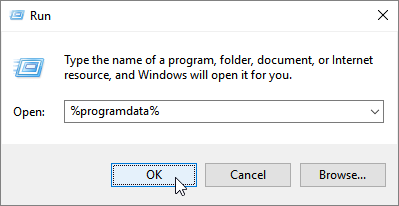
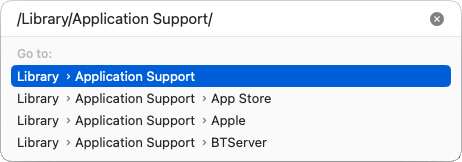
- On macOS, open Finder, select Go> Go to Folder, type:
/Library/Application Support/then click Return.
- On Windows, press the Windows Key
- Open the folder with the same name as the program and version you're using.
For example, "Chief Architect Premier X16" or "Home Designer Pro 2025".
- On your keyboard, hold down the Ctrl key if you're using Windows, or Command if you're using a Mac, and click to group select the following folders:
- Bonus Libraries
- Manufacturer Data
- Manufacturer Libraries
- Referenced Files
Do NOT copy or backup the Program_Data folder or the dont_change.dat file. They contain unique, encrypted registration information and if you try to use a copied and pasted version of either, your license registration will no longer be recognized by our registration server.
-
When the folders are selected as a group, copy them to your chosen backup location.
To restore these files, repeat these steps in reverse, copying from your backup location to the original folder. For additional information about backing up and restoring content, please see the Related Articles section.
To back up individual catalogs from the website (3D Library)
- Access the 3D Library website.
- In the top right corner, click on Log In To Download and proceed to sign in to your Chief Architect account.
If you're already signed in, a Log Out option, along with your Chief ID will be listed instead.
Note: If you cannot remember your password, click on "Forgot My Password" to reset your password.
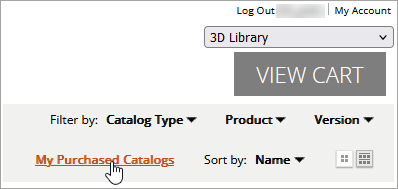
- Once signed in, download any catalogs you would like to maintain backups of. Any catalogs already purchased can be found by clicking the My Purchased Catalogs link located in the top right corner.
- One-by-one, click on the Download Arrow
 icon or the Download
  button, then click on the applicable Chief Architect/Home Designer version.
- Depending on your web browser, you will be prompted to either Open or Save the library file; choose the Save option. Save the file to an easy-to-access location, such as your Desktop or Downloads. If you were not prompted to select a destination, the file was likely saved to your Downloads folder by default.
- Access the folder where the file is saved, then copy or transfer it to your chosen backup location.
To restore this catalog, navigate to Library> Import Library within the Chief Architect/Home Designer program, then select the file to begin the import process. For more information, please see the Related Articles section.