Creating a Cathedral Ceiling
Reference Number:
KB-00160
Last Modified:
January 30, 2026
This article also applies to the following legacy products:
Pro | Architectural | Suite
Pro | Architectural | Suite
QUESTION
Is it possible to create a room with a ceiling that follows the pitch of the roof?
ANSWER
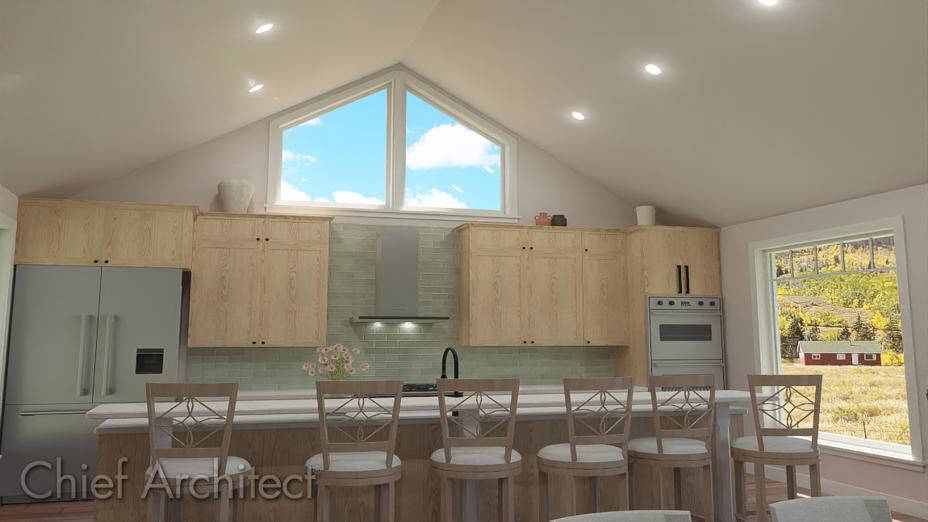
A ceiling that follows the underside of the roof is sometimes referred to as a cathedral ceiling, and can be created by disabling the flat ceiling setting within a room specification dialog.
In Home Designer and legacy Home Designer Pro you can draw custom ceiling planes to create a cathedral ceiling that has a different pitch than the roof. For more information on that process, please see the Custom Ceiling Planes training video.
To create a cathedral ceiling
- Using the Select Objects
 tool, click inside of a room you want to have a cathedral ceiling, and select the Open Object
  edit button.
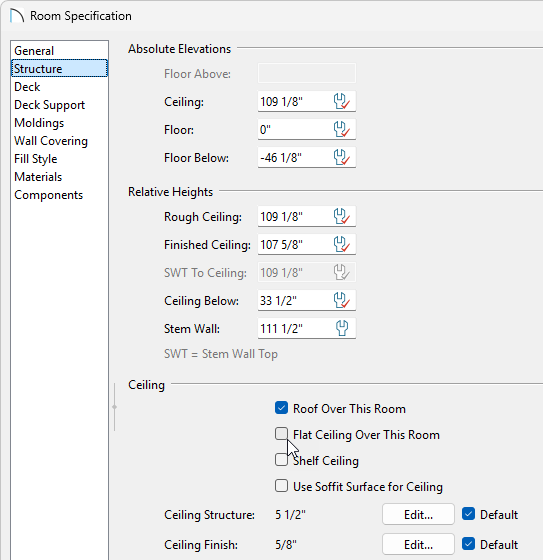
- On the Structure panel of the Room Specification dialog, uncheck Flat Ceiling Over This Room, then click OK to close the dialog and apply your change.
In Home Designer 2024 and newer versions, flat ceilings can also be removed by selecting a room and clicking the Turn Off Ceiling edit tool.
- Create a Camera
 view of your design to see that the view of that room will now show the underside of the roof, rather than flat ceiling planes.
Related Articles