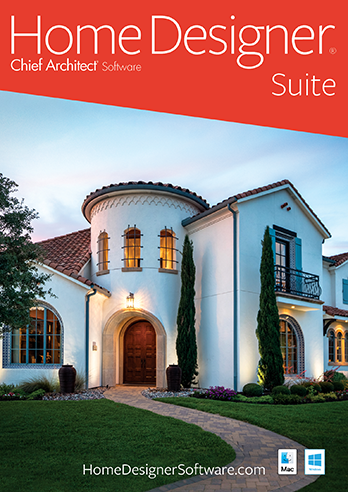
Design or Remodel Your Home Today!
Home Designer Suite by Chief Architect Software provides a fun and an advanced yet easy to use set of tools for Home Design, Remodeling, Interior Design, Kitchens, Baths, Decks, Landscaping and Cost Estimation.

Powerful, Fun & Easy Home Design Software
- Perfect for Home Design, Remodeling and Landscaping
- Over 1,500 Sample Plans for design inspiration
- Choose from built-in home style templates, create your own custom home design or use the House Wizard™
- Powerful building tools like automatic roof generation, dormers, stairs, framing and foundations
- Visualize your new Kitchen or Bath

Interiors & Exteriors
- Design and decorating style ideas with inspirational photos by rooms
- Material Painter® lets you apply colors and materials quickly and easily
- Choose from thousands of colors and textures or create your own materials using a digital photograph
- Design for your lifestyle and personality – change colors, add lighting and choose furniture to accent your new room
- Choose from a variety of interior items – including chairs, tables, sofas, fabrics, accessories and more. Resize, change colors and materials to meet your exact needs.
- Smart Design Objects, Drag-and-drop from thousands of design objects in the built-in Library organized by category

Kitchens, Baths & Custom Cabinets
- Design the Kitchen of your dreams – move walls, create new cabinets, add appliances – Design your perfect workspace!
- Plan the new layout of your bathroom with custom cabinets, sinks, showers and garden tubs. It’s easy to visualize your ideas in 3D.
- Create custom cabinets in minutes by choosing your own colors, countertops, door styles and more
- Design your new kitchen or bath using the Cabinet Designer™ Tools
- Use the Cabinet Designer™ tools to create unlimited cabinet styles. Choose your own colors, countertops and door styles.

House Wizard & Tutorial Videos Make it Easy!
- The Quick Startup Options Guide will help you begin with "How-To" tutorials based on the type of your project
- Use the House Wizard™ for quick and easy layout of your rooms
- Select from the pre-designed Home Design, Interior and Landscaping Style Templates complete with colors, cabinets, decks and more
- The online help system provides detail information on all types of building projects
- Includes over 30 easy "step-by-step" tutorial training videos that will quickly get you started on your next home design project

Decks & Landscaping
- Powerful deck and patio tools allow you to design and visualize your new deck with 3D models and can help you estimate the costs
- Design single or multi-level decks complete with automatic deck framing
- Quickly lay out your deck with stairs and arrange furniture
- Deck foundations automatically generate to match sloped lots
- Estimate Cost and create cut and buy lists for your decking projects
- Plant Encyclopedia to learn more about the plants in your designs
- Choose from over 1,500 plants with the Plant Chooser™
- Pathways – Use the Stepping Stone tool to design curb-appealing landscaping using stone, pavers or sidewalks – line with trees, shrubs, flowers and more
- Create a custom Pergola, Patio cover or Deck cover

3D Models & Virtual Tours
- Design in 2D and 3D. 3D Views are automatic with a point-and-click of the camera tool.
- Glass House™ View provides a full translucent view of your design
- Doll House™ View, a 3D overview without the roof, is an effective tool for space planning of furniture placement and traffic flow
- Create a Virtual Tour – draw your record line to Automatically Generate; or record your camera movements
- Visualize your home with day and night views
- Assemble a scale model of your design with Model Maker™
- Generate shadows from the sun for realistic 3D views
- Point-and-click to remove wall surfaces, or use 3D Cross-Section Elevation Slider™ to quickly create a 3D slice of your desired view

Site Planning & Estimating
- Use Automatic Build Terrain and Terrain Perimeter tools to create flat, irregular shaped or sloped lots – use a GPS to import or enter elevation data
- Create plot and perimeter plans; automatically generate a 3D model of your actual terrain
- Make your backyard design come alive using several easy-to-use terrain and landscaping tools. Add a pool or pond and visualize in 3D.
- Fences and Driveways – With the Fencing tools you can choose a variety of fencing styles and custom gates. You will also find driveway, sidewalk and curbing tools
- Hill and Valley tools make it easy to add gardens, beds and slopes that automatically appear in 3D views. Choose from landscaping style templates or create your own.
- Cost Estimating – Don’t be surprised by the cost of your project. Automatically generate a complete spreadsheet for your project costs, broken down by category. Calculate the amount of lumber for your deck or concrete required for that new patio.
Includes Free Online Tutorial Videos – with over 30 How-To Videos
System Requirements:
- Windows® 8 / 7 / Vista / XP
- 2.4 GHz processor
- 2 GB of Memory (32 bit OS)
4 GB of Memory (64 bit OS)
- 256 MB of dedicated video memory, supporting OpenGL 2.1 or higher
- High speed Internet for: registration, video access, content download
- 6 GB of disk space
- How to run on a Mac

Made and supported in the USA.